AI NPCs for games
Characters that hold an unscripted conversation, notice what's around them, walk, gesture, run your Blueprint logic — and talk to each other.
Dialogue trees have a hard ceiling: the player can only ask what a writer thought of. An IAMX NPC has a persona, a memory, knowledge of your world, and a set of things it is allowed to do — so the player can ask anything, and the answer stays in character.
What an IAMX NPC can do that a scripted one can't
| Capability | What it means in your game |
|---|---|
| Unscripted conversation | The player speaks or types anything. The NPC answers in character, in its own voice, with lip sync. |
| Scene perception | The NPC knows what's around it. "What's that on the table?" gets a real answer, because the objects you registered are described to it. |
| Movement | It can decide to walk somewhere, follow the player, stop, or wait — because the conversation called for it, not because a trigger volume fired. |
| Gestures | It picks gestures to match what it is saying. |
| Your own actions | Anything you expose from Blueprint: open a door, hand over an item, start a quest, sound an alarm. |
| NPC-to-NPC | Two NPCs can hold a conversation with each other while the player listens. |
| Memory | It remembers the player between sessions — what they did, what they promised, what they were told last time. |
| Lore that stays consistent | Your world bible goes in the Knowledge Base, so the NPC quotes your canon instead of inventing it. |
Start from the Game NPC template
In the panel, Characters → New character → Game NPC presets everything sensibly for a game: proximity interaction, a witty personality, short answers, and scene awareness plus gestures already switched on.
Making it aware of the world
On the character's Avatar Studio tab, switch on:
- Game Actions — gives the NPC move-to, follow, stop and wait. Now "wait here, I'll be back" is a thing it can actually do.
- Conversational Gestures — it chooses hand gestures while speaking.
Then, from Blueprint, tell it what is around it. You register the objects and characters in the scene you want it to know about — a name and a short description each — and those become things it can talk about and target.
Scene objects you register:
  "Tavern door"      — heavy oak door, leads to the street
  "Bruno"            — the blacksmith, working at the anvil
  "Locked chest"     — iron chest by the fireplace, no key in sight
The NPC can now answer "who's that by the anvil?", walk to the door when it says it's leaving, and refuse to open the chest because it hasn't got the key.
Letting it run your game logic
This is the part that turns conversation into gameplay. You define an action in Blueprint — GiveQuest, OpenGate, HandOverItem — with a description of when it should be used. The NPC decides to call it mid-conversation and your Blueprint runs.
- Define the action and describe it the way you'd brief an actor: "Use this when the player agrees to help find the missing shipment."
- Wire the event in your Blueprint to whatever should happen — start the quest, spawn the marker, play the cutscene.
- Test with an oblique request. Don't say "give me the quest"; say "alright, I'll look into it" and check it fires. That is the behaviour players will actually produce.
NPCs that talk to each other
Two IAMX NPCs can hold a conversation between themselves — guards gossiping on a wall, merchants arguing over a price, a companion reacting to what a stranger just said. The player can walk up and join in, and the conversation absorbs them rather than resetting.
It is also the cheapest way to make a space feel inhabited: two characters with opinions produce more atmosphere than twenty with ambient barks.
Quests and story structure
For an NPC that has to move a story forward rather than just chat, use the Narrative tools to lay out the stages of the interaction and what moves the player from one to the next. The NPC improvises the words; the structure keeps it on mission.
Practical matters
Cost per NPC
You are charged per conversation turn, not per NPC. A hundred NPCs standing around cost nothing until a player talks to one. Use the cheapest model that holds character — for most NPCs a small fast model is not just adequate, it is better, because response latency is what breaks immersion.
| NPC type | Suggested setup |
|---|---|
| Ambient villager | Small fast model, temperature 0.9, 250 tokens, no tools |
| Quest giver | Small fast model, narrative structure, your Blueprint actions attached |
| Companion who remembers you | Mid-tier model, memory on, generous retention |
| Central story character | Flagship model, world lore in the Knowledge Base, tools attached |
Latency
Three settings dominate how alive an NPC feels, and none of them is the model's intelligence:
- Voice model — pick the fastest one. The gap between 75 ms and 500 ms before the NPC starts speaking is the difference between a character and a menu.
- Answer length — shorter answers start playing sooner and end sooner.
- Interruption — let the player cut the NPC off. Real conversation does that constantly.
Keeping it in character
Use Guardrails to stop the illusion breaking: no discussing the real world, no admitting to being an AI, no answering questions about things this character could not possibly know. A medieval blacksmith explaining machine learning ends the immersion instantly.
Getting started
- Install the plugin in your project.
- Create a character from the Game NPC template and write its persona.
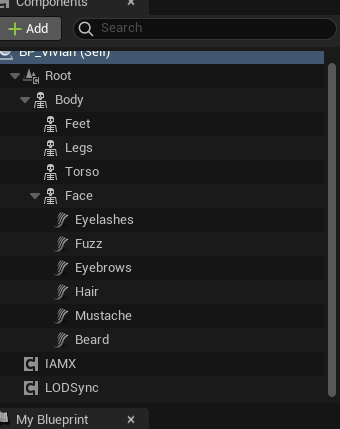
- Add the IAMX component to your NPC Blueprint and paste the character ID.
- Add the three animation nodes so it lip syncs and looks at the player.
- Press Play and talk to it. Then start adding scene objects, actions and lore.