Actions
A character that does things — not just says them.
Most conversational characters end at the sentence. IAMX doesn't. An IAMX character understands intent from natural speech and turns it into real behavior — it walks across your level, fetches an object, follows the player, plays an animation, highlights a product, or reaches out to your backend to answer with live data. You describe what the character can do; the AI decides when to do it and on what, and IAMX hands you the resolved target in Blueprint so you close the loop with your own game logic.
There are two kinds of actions, and this page covers both in depth:
In-world actions
Physical behavior inside your level — movement, following, picking things up, playing animations, interacting with props. Defined in your project, executed by your Blueprints.
System actions
Reaching outside the level — HTTP GET/POST calls to weather, stock, order status, or your own API, plus built-in assistant actions for e-mail, calendar and messaging. Defined in the panel.
Act in your world
Talk to the character in plain language and it responds with motion and behavior in the level. No rigid command grammar, no keyword matching — you speak naturally and the AI maps intent to the abilities you've given it, resolves which actor in the scene you meant, and fires the corresponding event for you to implement.
You: "Grab that coffee mug from the counter and bring it over."
The character: walks to the mug on the counter → picks it up → walks back and brings it to you — narrating naturally as it goes ("Sure, one sec — grabbing it now.").
That single spoken sentence turned into three resolved decisions: which object ("that coffee mug" → the registered MugActor), what to do (move to it, then a custom pick_up, then move back), and in what order. You didn't script any of that branching. You only told IAMX what exists in the world and what the character is capable of.
The three pieces
- Register scene actors — tell the AI what it's allowed to act on, and describe each one in human terms so intent resolves correctly. Call
Register Scene Actor(MugActor, "a coffee mug on the counter")for every prop, person or point of interest the character should be aware of. The description is what the AI matches spoken references against — "that mug", "the cup by the coffee machine", "it" — so write it the way a person would refer to the thing. - Give it abilities — movement is built in:
move to,follow,stopandwaitwork out of the box against any registered actor. Add your own verbs withRegister Action—pick_up,open_door,play_animation,highlight_product, whatever your experience needs. Each action gets a name and a short description of when it applies; that's all the AI needs to start choosing it at the right moment. - Implement the payoff in Blueprint — the AI decides when to act and on which target, then fires an event with the resolved actor already attached. Built-in movement raises
On Action Move To; anything you registered raisesOn Action Custom. You wire these to your existing gameplay — a nav-mesh move, an attach-to-socket, a montage, a material swap — and the character's words and behavior stay in sync.
What comes back to Blueprint
| Event | Fires for | You receive |
|---|---|---|
On Action Move To | Built-in movement (move to / follow / stop / wait) | The resolved target actor and the movement kind |
On Action Custom | Any verb you added with Register Action | Action name, resolved target actor, and any parameters the AI filled in |
On Action Received | Every action, before it runs | The full decision — useful for logging, gating, or a global handler |
Every decision the character makes flows through an inspectable Action Queue. Because complex requests decompose into an ordered sequence ("go to the mug", "pick it up", "come back"), the queue lets you see exactly what the character intends to do next, run steps in order, and pause, reorder or cancel them from your own logic. On Action Received fires for each item as it's dequeued, giving you a single choke point to observe or veto behavior before it plays.
Spoken intent
   "Grab that coffee mug from the counter and bring it over."
        │
        ▼
  ┌──────────────┐
  │ Action Queue │   1. move_to      → MugActor
  │  (inspect)   │   2. pick_up       → MugActor
  │              │   3. move_to       → Player
  └──────┬───────┘
         │  On Action Received  (per item)
         ▼
  On Action Move To ──► your nav-mesh move
  On Action Custom  ──► your pick_up montage + attach
No server or panel setup for in-world actions. The actions you define in your project are sent to the AI at the start of the session and come straight back to your Blueprints as events. There's nothing to deploy and no panel configuration required — it works the same in cloud mode as it does locally.
Writing good actor and action descriptions
Resolution quality is almost entirely a function of how you describe things. A few rules of thumb:
- Describe actors the way a person points at them.
"the red mug next to the register"beats"Actor_017"— the AI matches spoken references against your text. - Disambiguate similar objects. If there are two mugs, give them distinguishing descriptions ("the chipped white mug", "the branded travel mug") so "that one" lands on the right target.
- Name actions as verbs, describe the trigger.
open_door— "use when the user wants a door opened or asks the character to let someone through." - Keep the ability list scoped to the scene. Register only what's reachable now; a smaller, relevant set makes the character decide faster and more reliably.
An unregistered actor is invisible to the character — it can't move to or act on something it was never told about. If a request should work but doesn't, the first thing to check is whether the target was passed to Register Scene Actor with a description the AI can match.
Reach into your systems
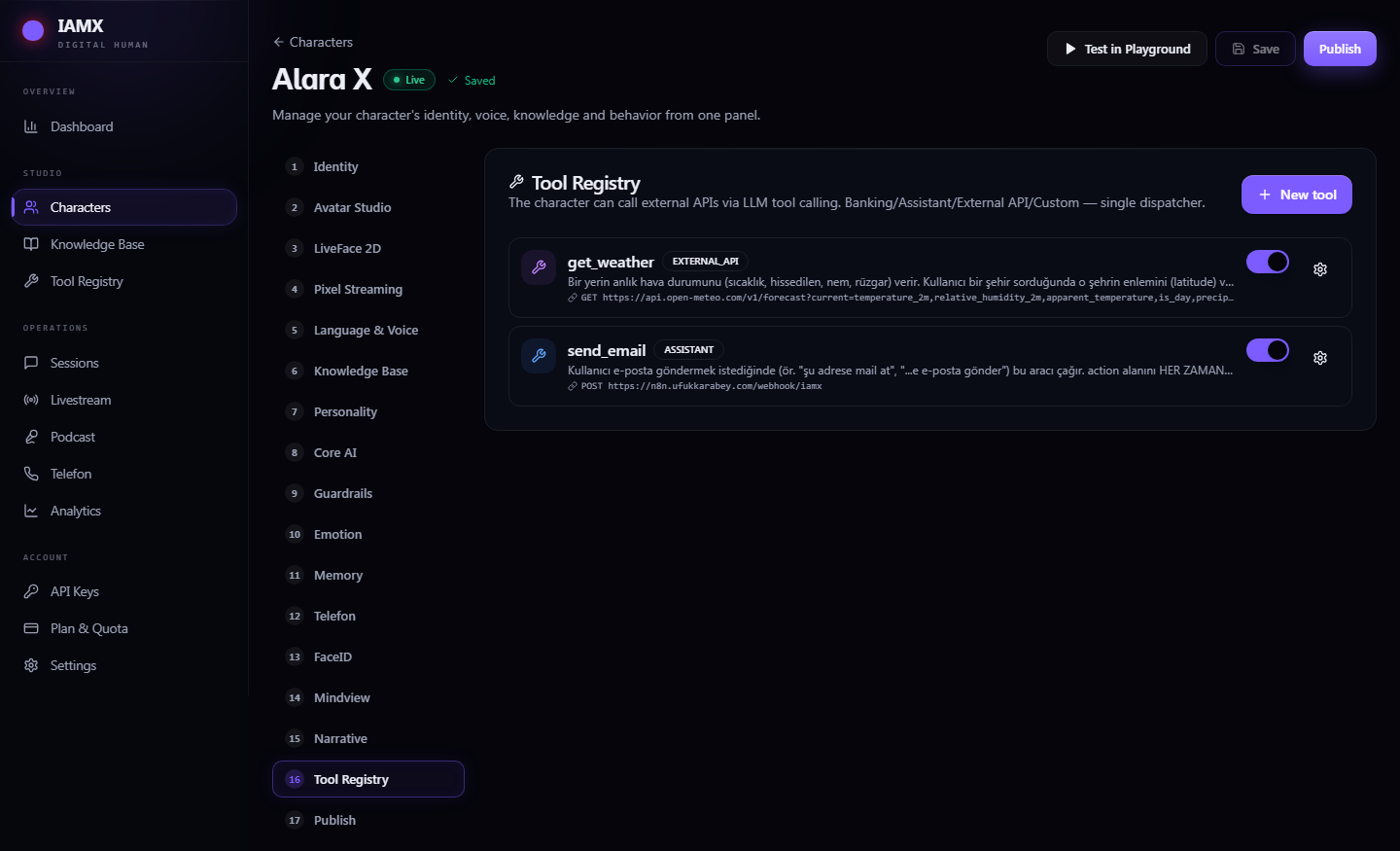
In-world actions move the body; system actions reach outside the level. In the IAMX panel you define HTTP actions — a name, a description of when to use it, an endpoint, a method, and the parameters — and the character calls them on its own whenever the conversation calls for it, then answers naturally using whatever the endpoint returns.
Ask "what's the weather in Istanbul?" and the character calls your weather action, reads the JSON that comes back, and replies "It's 22 degrees and clear right now" — in its own voice, in the language of the conversation. The same pattern covers a stock lookup, an order-status check, or any route on your own backend.
| Setting | What it does |
|---|---|
| Name | Internal identifier the AI uses to select the action |
| Description | When to use it — the AI reads this to decide relevance ("use for current weather by city") |
| Method | GET or POST |
| Endpoint | The URL to call, with parameter placeholders |
| Parameters | The fields the AI extracts from conversation and fills in (e.g. city, order_id) |
How a system action resolves
- Match — the AI recognizes the request maps to a defined HTTP action and pulls the parameters it needs from what was said.
- Call — IAMX performs the GET/POST to your endpoint with those parameters.
- Answer — the response is handed back to the AI, which turns the raw result into a natural spoken reply. Your endpoint returns data; the character returns a sentence.
User: "Where's my order 48213?"
  → AI selects  order_status(order_id = 48213)
  → GET https://api.yourstore.com/orders/48213
  ← { "status": "shipped", "eta": "tomorrow" }
  → "Good news — order 48213 shipped and should arrive tomorrow."
Built-in assistant actions
Some system actions are common enough that IAMX ships them ready to use. Turn them on and the character can handle everyday assistant tasks conversationally:
Check and send mail on request — "read me the latest one", "reply and say I'll be there."
Calendar
Look up what's coming and create events — "am I free Thursday afternoon?", "book a 30-minute call."
Messaging
Send messages through your connected channels when the conversation asks for it.
Gate sensitive actions on identity. System actions that touch real accounts or move real data can be restricted so the character only performs them once the user has been verified, keeping high-stakes operations behind a check while everyday questions stay frictionless.
Putting it together
The two families compose. A retail concierge might highlight_product a shelf item (in-world), then call an inventory HTTP action to confirm stock, then move to the checkout — all from one spoken request, all narrated naturally as it happens. You define the vocabulary; the character supplies the judgment about when and on what to use it.
Start with movement
Register a couple of actors and try "come here" and "follow me" — movement is built in, so this works with zero custom actions. See /docs/quickstart.
Wire the events
Full signatures for On Action Move To, On Action Custom and On Action Received are in the /docs/blueprint-api reference.
For the complete list of action events and their parameters, see /docs/blueprint-api. To see actions running live, try the demo at iamx.live, and share what you build on the forum.