Animation nodes
Three AnimGraph nodes bring the face and gaze to life — non-destructively.
IAMX ships three purpose-built AnimGraph nodes that layer a live, conversational performance on top of whatever your character is already doing. Right-click in any AnimGraph, type "IAMX" in the node search, and you'll see them appear. Drop them into your pose chain and wire them up — no rebuild of your existing animation setup required.
The defining principle is that every one of these nodes is additive. They read the pose flowing into them and blend their contribution on top — mouth shapes, eye direction, head rotation — before passing the result along. Your idle loops, gesture montages, locomotion blendspaces, and hand-authored keyframes all keep running underneath. Nothing you built is overwritten, and if IAMX has nothing to say at a given frame, the pose passes through untouched.
How the nodes fit together
You'll typically use two Animation Blueprints on a character: a Face ABP that drives facial blend shapes, and a Body ABP that drives the skeleton. IAMX has nodes for both. In each graph the rule is the same — insert the IAMX node(s) between your existing pose and the Output Pose, so they get the last word on the parts they control.
Read
Each node samples the incoming pose so it always blends relative to your current animation, never from a bind pose.
Blend
Only the affected channels are touched — mouth and jaw for lip sync, eye bones for gaze, neck/head for head look-at.
Pass through
Everything the node doesn't drive continues downstream unchanged, straight to the Output Pose.
Face Animation Blueprint
In your character's Face ABP, add two IAMX nodes just before the Output Pose. First the lip sync node applies the streamed facial performance; then the eye look-at node aims the gaze. Chaining them in this order means the eyes are placed on top of the fully-formed facial expression.
[ existing pose ] -> [ IAMX Lip Sync ] -> [ IAMX Eye Look At ] -> [ Output Pose ]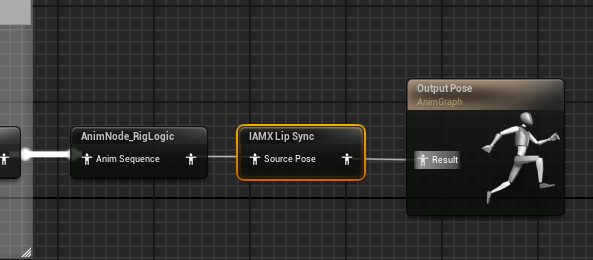
IAMX Lip Sync dropped into a Face ABP — it takes the rig's evaluated pose as Source Pose and feeds the Output Pose, so the streamed performance lands on top of the face you already have.- Open the Face ABP — the one that already drives your character's facial rig.
- Find the Output Pose — locate the final pose pin at the end of the AnimGraph.
- Insert IAMX Lip Sync — right-click, search "IAMX", and drop it in. Connect your existing pose into its input.
- Insert IAMX Eye Look At — add it after the lip sync node, feeding its output into the Output Pose.
- Compile & save — the moment a conversation begins, the mouth moves in sync and the eyes find the player.
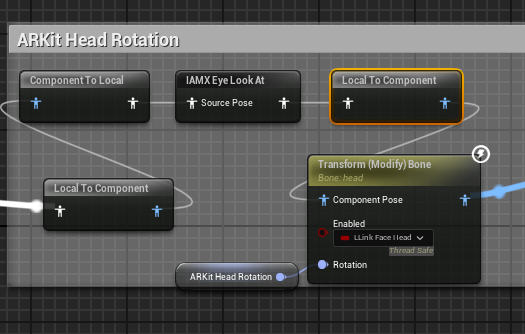
IAMX Eye Look At living inside a real face graph — here it's chained through the graph's existing space-conversion and head-rotation nodes. The node only writes the gaze channels, so the rest of the section keeps working as authored.Because both nodes are additive, your character can still blink, emote from a facial montage, or run a baked expression underneath — IAMX only writes the channels it owns.
Body Animation Blueprint
In the Body ABP you add a single node. The head look-at turns the head toward the player so the character feels present and attentive, while your locomotion, idles, and gesture layers keep driving the rest of the skeleton.
[ existing pose ] -> [ IAMX Head Look At ] -> [ Output Pose ]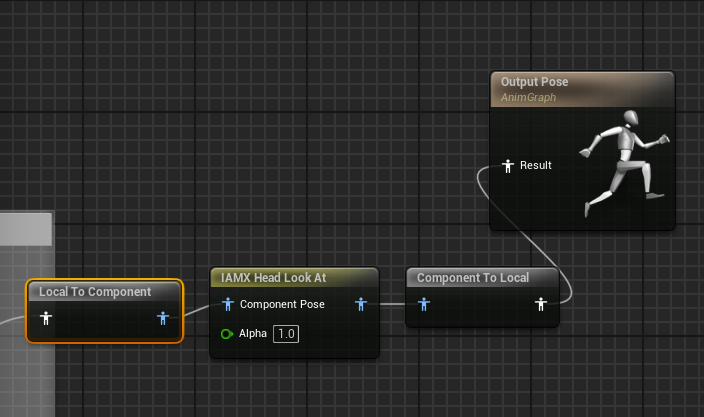
IAMX Head Look At as the last stop before the Body ABP's Output Pose — existing pose in, corrected head out. Alpha lets you fade the whole effect in and out.- Open the Body ABP and scroll to the end of the AnimGraph.
- Insert IAMX Head Look At — right-click, search "IAMX", place it right before the Output Pose.
- Re-route the final link — feed your existing pose into the node, and the node's output into the Output Pose.
- Compile & save — the head now tracks the player during conversation, within natural limits.
The three nodes at a glance
| Node | Graph | What it does |
|---|---|---|
IAMX Lip Sync |
Face ABP | Applies the streamed facial performance — mouth, jaw and expressions — driven live by the character's speech so the visemes match the words being spoken. |
IAMX Eye Look At |
Face ABP | The eyes find and track the player's camera during conversation, giving natural, focused eye contact instead of a dead-ahead stare. |
IAMX Head Look At |
Body ABP | Turns the head toward the player with natural rotation limits and smoothing, so the character orients to whoever it's talking to without snapping or over-rotating. |
Tuning
Each node exposes a small, focused set of controls so you can match the character's personality and the physical setup of your scene — a kiosk camera at eye height behaves differently from a seated desktop view. All tuning is non-destructive: it only shapes IAMX's additive contribution and never alters the animation underneath.
Lip sync
- Smoothing — controls how tightly the mouth follows the incoming performance. Lower values are crisp and punchy; higher values soften transitions between shapes for a calmer read.
- Fade — governs how quickly the mouth settles back to a neutral rest when speech stops, so the character closes its mouth gracefully instead of freezing on the last shape.
Eye & head look-at
- Natural limits — clamp how far the eyes and head are allowed to rotate toward the target, keeping the pose believable and preventing extreme, unnatural angles.
- Smoothing — eases the gaze onto the player so tracking feels like a living glance rather than a mechanical lock, and rides smoothly if the player moves.
Works with your rig
Next steps
Blueprint API
Trigger speech, drive conversation state, and hook events that the nodes react to. See /docs/blueprint-api.
Custom avatars
Map the performance onto a non-MetaHuman face rig. See /docs/custom-avatars.
See it live
Try a talking character and grab the plugin from the live demo & panel or releases.
Questions about a specific rig or blend shape setup? Ask on the forum, or read setup deep-dives on the blog. Source and issues live on GitHub.