Teacher mode
A character that doesn't just explain the equation — it writes it on the board while it talks.
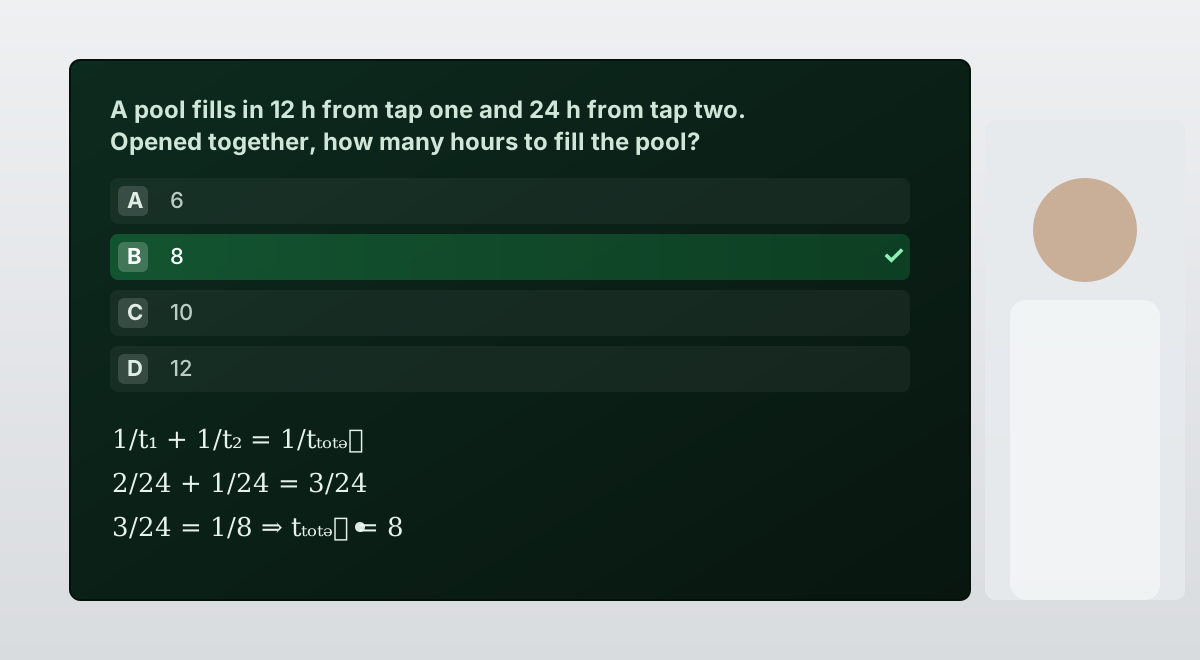
Some things cannot be taught out loud. A quadratic formula read aloud is noise; written on a board while someone talks you through it, it teaches. Teacher mode gives a character a board it controls itself — it decides when a step needs to be seen, writes it, and keeps talking.
Switching it on
Open the character's Avatar Studio tab and turn on Teacher Mode (classroom board). That single switch gives the character the board and the instructions for using it well.
The board is rendered by the client — the Unreal build or classroom display showing your character. Switching the mode on in the panel prepares the character; the surface it runs on has to have a board to write to.
What the character can put on the board
| It writes | When |
|---|---|
| Formulas | Any time a step is mathematical. Written properly — fractions, roots and exponents laid out as they should be, not typed as plain text. |
| Notes and headings | Key terms, the definition it just gave, the three steps it is about to walk through. |
| Quiz questions | When it wants to check understanding. The question and its options go on the board. |
| Highlights | After the student answers, it lights up the correct option and explains why. |
| The final answer | Emphasised as its own block, so the result of a worked problem is never left buried in the middle of the working. |
How it behaves
- The board never replaces speech. The character always says something too — a board that changes in silence is unsettling to watch.
- It never reads formula markup aloud. What you hear is "x equals minus b, plus or minus the square root of…", while the board shows the notation.
- It clears the board between topics, the way a real teacher does, rather than writing over a full board.
- It doesn't read the quiz options aloud one by one — it says "I've put a question up, have a look" and lets you read them.
- It won't give away the answer before the student has had a go.
Getting good lessons out of it
- Write the persona as a teacher, not an encyclopaedia. "You teach ninth-grade maths. You are patient, you ask before you explain, and you never give the answer before the student has tried" produces a different character from "You are a helpful maths assistant".
- Put the curriculum in the Knowledge Bank. The syllabus, the worked examples, the marking scheme. Then the character teaches your course rather than its general knowledge.
- Raise Max Tokens a little. Teaching answers are legitimately longer than kiosk answers — but not so long that the student stops listening.
- Lower the temperature. Maths explanations should be consistent between students; 0.3–0.5 is a good range.
- Test with a wrong answer. The most important thing a teacher does is handle a mistake well. Give it a wrong answer in the playground and see whether it corrects gently and re-explains, or just says "no".
A character with teacher mode and a knowledge base full of past exam papers makes an unusually good revision partner: it can pull a real question, put it on the board, wait, mark the answer, and explain what went wrong.