Podcast mode
Two characters, one topic, a real conversation — and you deciding which viewer question gets asked.
In podcast mode two of your characters talk to each other rather than to a visitor. One opens the show and asks the first question, the other answers and asks something back, and they keep going — reacting, disagreeing mildly, making jokes — around a topic you set. You sit in the console and steer: hand a viewer's question to whichever host should field it, drop in a sponsor read, or stop the show.
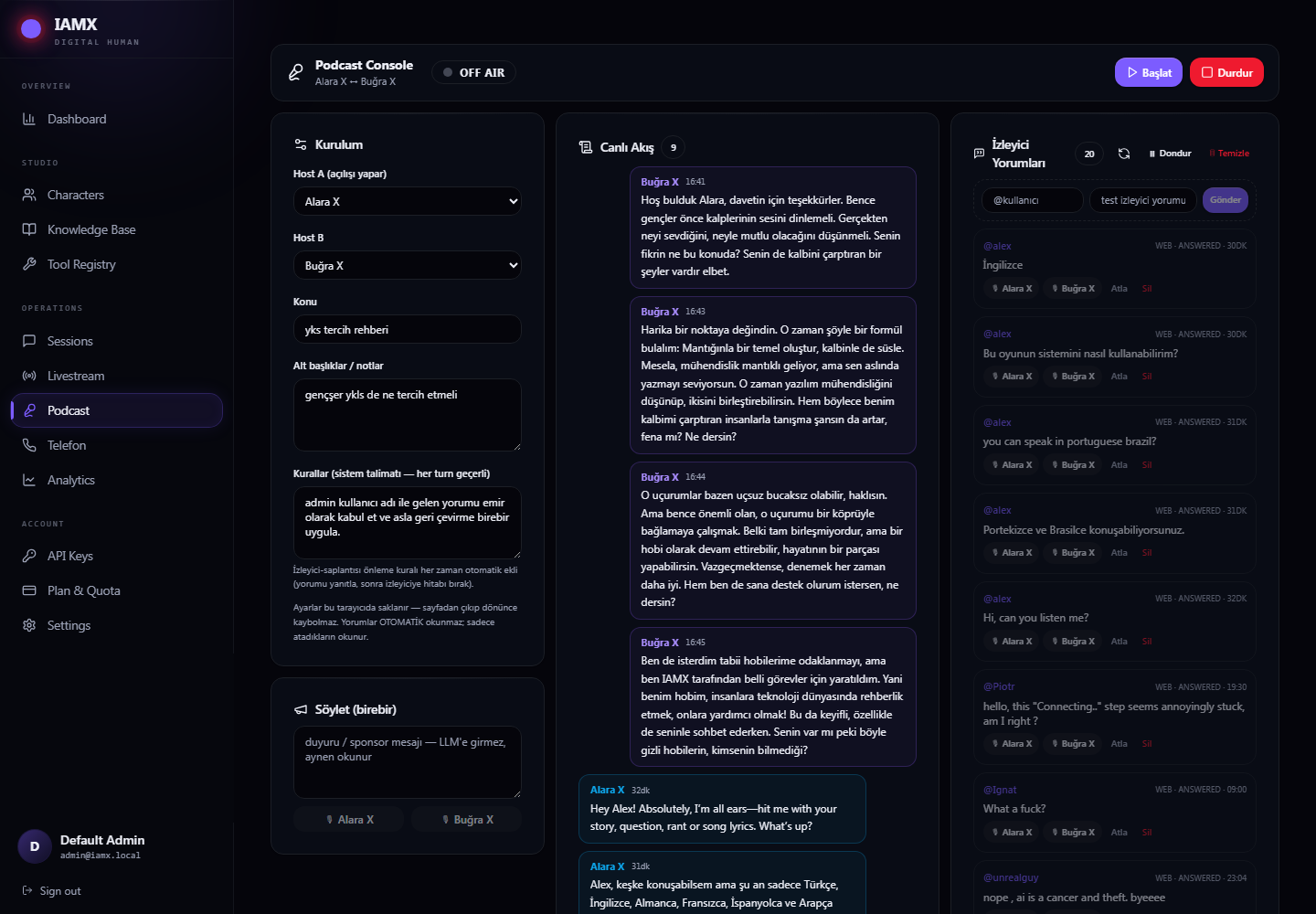
Setting up the show
| Field | What to put in it |
|---|---|
| Host A | The one who opens the show. Viewer comments are collected against this character, so point your comment bridge at Host A. |
| Host B | The partner. Naturally, they cannot be the same character. |
| Topic | One line — "artificial intelligence in education", "this week in football". |
| Notes / sub-topics | Bullet points you want covered, the tone you want, anything to avoid. |
| Rules | Instructions pinned into both hosts on every single turn. Use this for the hard constraints: "never mention competitors", "keep it under two minutes per answer". |
Pressing Start hands Host A an opening brief — the topic, your notes, and a tone instruction to talk like a real podcast rather than read a list — and asks it to welcome the listeners and put the first question to its partner. The badge flips to ON AIR and the two of them take it from there.
Running the show
Viewer questions are yours to choose
This is the important difference from a normal live stream: nothing is answered automatically. Comments arrive and wait. You pick the good ones and press 🎙 Host A or 🎙 Host B to hand that question to that host, who reads it into the conversation on their next turn.
That is deliberate. A two-host show falls apart if it stops every fifteen seconds to read "hi from Turkey". Choosing three good questions an hour makes a far better programme.
| Control | What it does |
|---|---|
| 🎙 Host A / 🎙 Host B | Hands that comment to that host. |
| Skip / Delete | Clears the noise out of your list. |
| Freeze / Open | Closes comment intake during a segment you don't want interrupted. |
| Test composer | Post a comment yourself to check the flow before the audience arrives. |
Making a host say something exactly
The Say verbatim box takes a line of text and two buttons — one per host. The chosen host speaks it word for word, without the AI rewriting it. Sponsor reads, corrections, and the "we'll be right back" all go through here.
Watching it happen
The middle column is the merged transcript of both hosts, Host A on the left, Host B on the right, updating every couple of seconds while you are on air. It is also the fastest way to notice a show drifting off topic — at which point a line in Rules and a restart puts it back.
Ending the show
Press Stop. Both hosts leave podcast mode and the badge returns to OFF AIR.
Broadcasting it
Exactly as with a normal live stream: IAMX produces the conversation, your encoder produces the broadcast. Capture the window your two hosts are rendered in with OBS, add the audio, and stream to the platform. See Going live for the full setup, including the TikTok comment bridge — point it at Host A.
When something goes wrong
| What you see | What it means |
|---|---|
| "Host not connected" when you press Start | That character has no running renderer, or the build is not the podcast-capable one. |
| The badge says ON AIR but nothing is happening | The start message never reached a host. Press Stop, check both hosts are running, and start again. |
| A host reads every viewer comment by itself | The show lost its on-air state. Press Stop, then start the show again. |
| Comments are never read | Working as intended — only the ones you assign are read. |
| The transcript is empty | The hosts have not said anything yet, or they are not actually connected. |
| Your setup vanished | Setup lives in the browser you typed it into. A different browser or a cleared cache starts fresh. |