

Enterprise phone calls
Put your AI character on a phone line.
On Enterprise plans, by agreement, an IAMX character can work as an AI voice agent for phone calls. It answers calls to a connected number and can place outbound calls with the same model, voice and instructions it uses on the web. Calls are audio only: callers hear the character, but no avatar is shown.
In short
IAMX lets Enterprise customers, by agreement, use a character as an AI phone agent: IAMX connects a phone number through its Telnyx account, and the character answers inbound calls and can place outbound calls with its configured model, voice and instructions. Phone calls are voice-only, each character listens in one set language, and telephony is not part of the Free, Starter, Pro, Scale or Business plans.
Key facts
| Plan | Enterprise only, by agreement (quoted) |
|---|---|
| Carrier | Telnyx, through IAMX's Telnyx account |
| Channel | Voice only, no avatar on calls |
| Call directions | Inbound; outbound to single numbers or lists of up to 200 per batch |
| Languages | One listening language per character |
| Records | Best-effort text transcripts, no call-recording feature |
| Not included | SMS, live-agent transfer, other carriers |
How an IAMX AI phone agent works
Phone calls are an Enterprise feature, set up by agreement. The number has to be connected to IAMX's Telnyx account, so IAMX sets it up and confirms which countries and numbers are possible for your project. How the number is provided is agreed per project, and Telnyx is the only carrier.
When a call comes in, the character linked to that number answers and runs its normal conversation: speech recognition, its configured AI model and its voice. A standard character can draw on its enabled knowledge documents. A character on a realtime speech-to-speech model (Gemini Live or OpenAI Realtime) replies in the provider's own voices and does not use your knowledge base on calls.
Calls are audio only. The caller hears the character, but no face, avatar or video is shown, and a website conversation does not carry over to a phone call.
Answer inbound calls with an AI receptionist
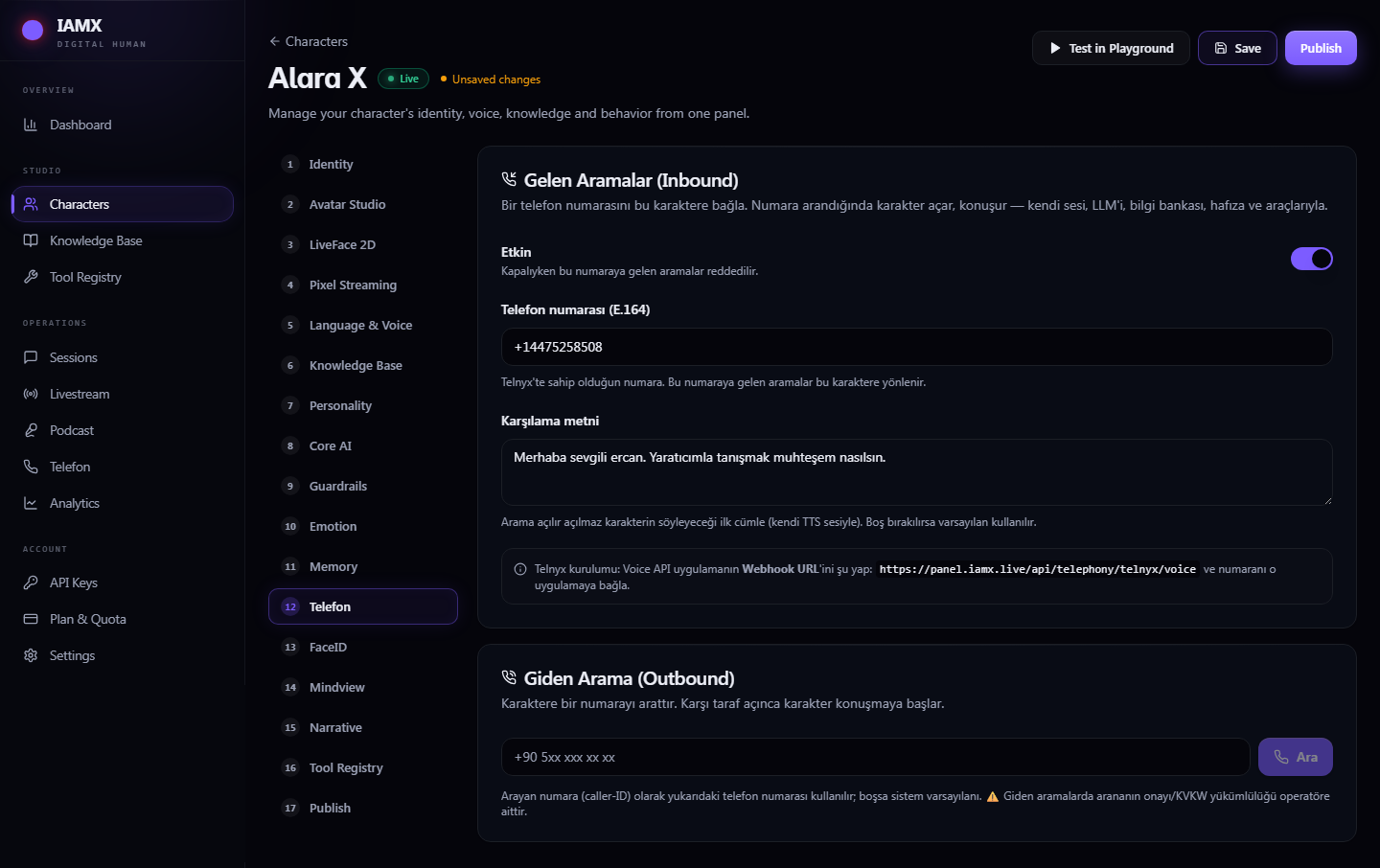
Each phone number routes to one character. In the character's Phone tab you switch the line on or off, enter the number in international format starting with +, and write the greeting. While the line is off, or once the workspace no longer has the Enterprise phone feature, calls to the number are declined.
Write the greeting in your callers' language, because the default greeting is Turkish when the field is left blank. A realtime-voice character is asked to say your greeting in the model provider's voice and may not repeat it word for word.
- An after-hours line that answers common questions from your reviewed documents (standard characters only)
- A front-desk line that explains opening hours, directions and which contact channel a caller should use
These are configurations you can build, not completed customer deployments. Test an AI receptionist for calls with the questions your callers actually ask.
IAMX has no built-in calendar or booking, so a phone character can book appointments or look up records only through your own HTTPS API registered in the Tool Registry. Test that connection on a real call.
Outbound AI calling, one call or a list
To call one number, pick a character on the Phone · Call Centre page, or open the character's Phone tab, and enter the number; the character starts talking as soon as the call is answered. For a list, paste up to 200 numbers per batch on the Phone · Call Centre page. IAMX starts a new call every few seconds in the background without waiting for the previous call to end, so several calls can be in progress at the same time.
Outbound calls show the character's own number as caller ID. If the character has no number saved, the call shows IAMX's default platform number instead, so save the character's number before you dial anyone.
Outbound calls open with the same greeting as the Phone tab, so write one that also works when the character is the caller. There is no answering-machine detection: if voicemail picks up, the character speaks to the voicemail.
Consent, AI disclosure and local calling rules are your responsibility. IAMX has no built-in do-not-call screening, consent records, calling-hour limits, scheduling or retries, and a batch cannot be paused or canceled once it starts. Use outbound calling for people who expect your call, test with your own number first, and do not use it for cold-calling or robocall campaigns.
Review calls in the call-center view
The Phone · Call Centre page shows totals for recent calls (inbound, outbound and average duration), the dial forms, which number belongs to which character, and a history of the most recent 150 calls. Each row lists the direction, the other party, the character, the time, the duration once the call has ended, the number of messages and a transcript link.
Transcripts are best-effort text, and IAMX offers no call-recording feature. Short or unclear caller turns can be missing, especially with realtime-voice characters. Declined inbound calls, and outbound calls that fail or are not answered, may not appear in the history, and a bulk batch only reports how many numbers were queued.
Language, interruptions and memory on calls
Each character listens in one set language on the phone, even if it is set to reply in all languages: speech recognition is pinned to the character's voice language, else its first listed language, and to Turkish if neither is set. Realtime-voice characters hear the audio directly, but their call transcripts use the same pinned language. For several languages, plan a separate character and number per language and test each one on real calls. Phone audio is narrowband, so speech is harder to recognize than with a good microphone; keep answers short and check transcripts.
Callers can cut the character off by speaking up over it for about half a second. Brief or quiet interjections while the character speaks are ignored, as is speech in the first second of each reply.
Long-term memory is on by default for new characters, but phone calls do not currently use the caller's number to recall earlier calls, so each call starts as a new conversation, even from the same number. The call history still stores each call's phone numbers and transcript, so describe how you handle phone data in your privacy notice.
Set up an AI phone agent
The number has to be connected on IAMX's side before a character can answer it.
- Agree on the phone setup with IAMX
Contact IAMX about an Enterprise agreement. IAMX confirms the available countries and numbers and connects the number through its Telnyx account.
- Prepare the character
Choose the model, voice and language in IAMX Studio and test a short conversation. Keep replies brief for the phone.
- Fill in the Phone tab
Switch the line on, enter the number in international format starting with +, and write a greeting in your callers' language that also works for outbound calls.
- Call the number yourself
Listen to the greeting, ask typical questions, try interrupting the character, then read the transcript in the call-center view.
- Test outbound calls on your own phone
Dial your own number before using a list, because a batch cannot be canceled once it starts.
The phone setup guide shows the Phone tab and call-center screens.
What the phone channel does not include
Check these limits before you plan a phone project.
- SMS or other text messaging
- Carriers other than Telnyx, SIP trunks or your own phone system
- Transfer to a live agent, staff notifications or an agent inbox
- Phone calls on self-serve plans, a call-recording feature, or an avatar on calls
For website support with approved answers, see the AI customer service agent page.
Frequently asked questions
Which IAMX plans include phone calls?
IAMX phone calls are an Enterprise-only feature, set up by agreement on a quoted plan. The Free, Starter, Pro, Scale and Business plans do not include telephony; see pricing or contact IAMX.
Can I use my existing phone number or phone provider?
IAMX phone calls run only through Telnyx, on numbers that IAMX connects through its own Telnyx account; Twilio, SIP trunks, your own phone system and your own Telnyx account are not supported. Whether a number you already have can be used, and which countries and numbers are available, is confirmed per project, so contact IAMX before you plan around a specific number.
Does IAMX record phone calls?
IAMX stores a best-effort text transcript and the phone numbers of each answered call, but it offers no call-recording feature. Caller audio is processed by the speech and AI providers the character uses, and transcripts can miss short or unclear caller turns. You remain responsible for telling callers how their calls and data are handled.
Which languages can the AI phone agent speak?
Each IAMX phone character listens in one set language: phone speech recognition is set by IAMX and pinned to the character's voice language or first listed language (Turkish if neither is set), and results also depend on the AI model and voice you choose. IAMX publishes no list of supported phone languages, so test each language on real calls, and write your own greeting because the default one is Turkish.
Can the AI phone agent transfer a caller to a human?
No. IAMX phone calls have no transfer to a live agent, no staff notification and no agent inbox. If you need escalation, connect your own support process.
What rules apply to outbound AI calling campaigns?
IAMX can call a list of up to 200 numbers per batch, starting a new call every few seconds, but it has no built-in consent records, AI disclosure, do-not-call screening, calling-hour limits, scheduling, retries, answering-machine detection or way to cancel a running batch. Getting consent, disclosing the AI and following local calling rules are your responsibility, and IAMX outbound calling is not meant for cold-calling or robocall campaigns.
Try your own workflow.
Prepare a character, ask real questions and check the experience on the device you intend to use. Contact us to discuss the scope of your setup.
Prepared by IAMX. Features and requirements.