

Unreal Engine plugin
Give your Unreal Engine NPCs a voice, facial animation and a conversation.
The IAMX Unreal Engine plugin connects an NPC in your project to a character you build in IAMX Studio. Players speak or type, and the NPC answers with speech, MetaHuman facial animation and actions your Blueprints carry out.
In short
IAMX adds conversational AI NPCs to Unreal Engine 5.3 to 5.8 through its Unreal plugin: you build the character in IAMX Studio and add the IAMX component to your NPC with an API key. The IAMX server then runs speech recognition, the language model, the voice and MetaHuman facial animation, while movement, gestures and other gameplay effects arrive as Blueprint events your project implements. The plugin runs on Windows 64-bit only, with no Mac, Linux, console, mobile or VR builds, and needs a network connection to IAMX or to an Enterprise on-premises IAMX server.
Key facts
| Engine versions | Unreal Engine 5.3 to 5.8 (GitHub release v1.1.0) |
|---|---|
| Platform | Windows 64-bit only |
| Connection | Required; the AI runs in the IAMX cloud or on an Enterprise on-premises server (by agreement) |
| You need | An IAMX account, a character in IAMX Studio and an API key |
| Facial animation | MetaHuman controls; other rigs need manual mapping |
| You supply | Characters, animation, movement and game logic |
| Usage | In the IAMX cloud, each conversation turn uses plan usage units |
What the Unreal Engine AI NPC plugin does
You add a single IAMX component to an NPC, and it connects to the IAMX server, where speech recognition, the language model, the voice and facial animation run. Your project does not bundle any AI models.
Core controls are Blueprint nodes: start and end a conversation, send text, open the microphone, interrupt the NPC while it speaks and inject runtime facts, such as the current quest. The plugin also includes a built-in chat widget and push-to-talk. You bring your own characters, animation and game logic, and the plugin does not change your Animation Blueprints. See the Blueprint API reference.
Long-term memory is on by default for new characters and is kept per character and player ID. The plugin's default player ID is the same for every player, so your project should send a unique, stable ID for each player; otherwise all players share one memory. Conversation languages depend on the selected AI model, speech recognition and voice.
MetaHuman AI NPC faces: lip sync, gaze and emotion
IAMX streams facial animation for MetaHuman characters together with the spoken audio. You place the IAMX lip-sync, eye look-at and head look-at nodes in your Animation Blueprints, and blinking is procedural. The stream uses MetaHuman control names, so another rig needs a manual mapping of each control to one of its blendshapes, and the result depends on the blendshapes that rig has.
Each character also carries an eight-axis emotion state, which a language model classifies from the conversation text, so it can misread a line; test it with your own dialogue. By default it drives expressions on MetaHuman faces; another rig needs each emotion mapped to its own morph targets by hand. Blueprints can read it, force an emotion or reset the state and react when it changes. The classifier is on by default and can be switched off per character in IAMX Studio; while it is off, the state no longer updates from the conversation.
Scene awareness and actions your Blueprints carry out
You register the objects and actors around an NPC from Blueprint, so the character can talk about them and target them in actions. Nothing is registered automatically.
- Built-in actions: move to, follow, stop, wait and play a gesture arrive as Blueprint events your project implements, so movement and pathfinding are your code and gestures play only montages you supply. They work only when enabled for the character and with the standard voice pipeline; the Game NPC template in IAMX Studio enables them.
- Custom Blueprint actions: expose actions such as opening a gate or giving a quest. The language model decides whether to call them, so these calls are not deterministic.
Scene objects, runtime facts, built-in actions and gestures work with the standard voice pipeline. If you switch the character to a realtime voice model (Gemini Live from Starter, OpenAI Realtime from Pro), it still receives your custom Blueprint actions but not those features.
NPC-to-NPC conversations and vision on demand
Two IAMX NPCs in the same game client can talk to each other. The language model writes the lines, up to a turn limit you set (six by default). Each line is a separate conversation turn that uses usage units, and any player input ends the exchange.
Your project can send frames from a scene capture, a render target or the player camera. With the standard voice pipeline, a recent frame reaches the AI only when the player asks the NPC to look at something in Turkish or English and the selected AI model accepts images; realtime voice models do not receive these frames. The NPC does not watch the game world continuously.
Choose how players start talking
Each conversational NPC uses one interaction mode:
- Manual: your Blueprints start and end the conversation.
- Proximity: the conversation starts when the player's character comes within a set in-game distance of the NPC; it is not a physical sensor.
- Voice activated: the microphone stays open for hands-free speech.
- Push to talk: the player presses a control while speaking.
- Wake word: with the standard voice pipeline, the NPC answers only when the transcript contains a phrase you set, such as its name. Other speech is still transcribed, and realtime voice models skip this check.
Set up an AI NPC in Unreal Engine
These steps connect one NPC in a Windows project to an IAMX character.
- Create the character in IAMX Studio
Set its instructions, voice and AI model, and test a short conversation. The Game NPC template enables the built-in game actions and gestures.
- Create an API key
Create a key on the API Keys page in IAMX Studio and copy it right away; the full key is not shown again.
- Download the package for your engine version
From the v1.1.0 release on GitHub, download the prebuilt Windows 64-bit package for your Unreal Engine version.
- Install and enable the plugin
Unzip it into your project's Plugins folder, enable IAMX under Edit > Plugins and restart the editor.
- Add the IAMX component
Add the component to your NPC. In its IAMX connection settings, enable the connection and enter the IAMX server address, your API key and the character ID. Field names differ between plugin builds, so follow the README in the package you downloaded.
- Wire the Animation Blueprints
Add the IAMX lip-sync, eye look-at and head look-at nodes. For a non-MetaHuman rig, fill in the control-to-blendshape mapping.
- Play and test
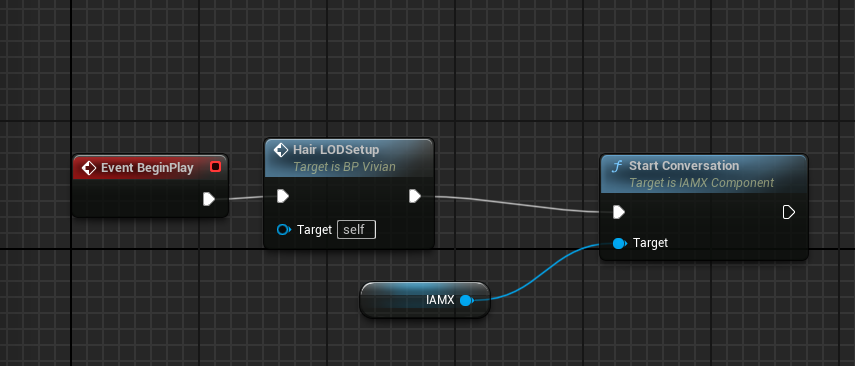
Call Start Conversation, for example from Event BeginPlay, or choose an interaction mode. Speak and type in Play mode and check the voice, lip sync and actions; if speech is not picked up, check the Windows microphone permission and input device.
The API key is masked in the editor but not encrypted inside a packaged project, so use a separate key per build that you can delete if needed.
Platforms, connection and usage
The public v1.1.0 release on GitHub provides prebuilt Windows 64-bit packages for Unreal Engine 5.3 to 5.8. By agreement, Enterprise customers can evaluate an on-premises IAMX edition on their own Windows server and supply their own language, speech and voice services. IAMX provides the Unreal Engine 5.8 plugin build and connection settings for that edition; face recognition, which needs a Pro or higher plan in the cloud, is not available in that mode. If you stream the scene to browsers, you run Pixel Streaming on your own GPU host.
With the IAMX cloud, every conversation turn uses usage units from your IAMX plan. Units are weighted, so heavier models and realtime voice use more. The hosted IAMX service is an early release, so test the full experience before you ship. Compare plans on the pricing page or contact IAMX.
Frequently asked questions
Does IAMX work with Unity or Godot?
No. IAMX has no Unity or Godot plugin or SDK; its game integration is the Unreal Engine plugin for Windows 64-bit. IAMX also has a real-time WebSocket API with no public reference yet, so developers who want to build their own client can contact IAMX for documentation.
Do I need a MetaHuman to use the IAMX Unreal plugin?
No. The IAMX Unreal plugin streams MetaHuman facial controls, so a non-MetaHuman rig needs each control mapped by hand to one of its blendshapes, and the result depends on the blendshapes that rig has. Emotion expressions drive MetaHuman faces by default; on another rig, you map each emotion to its own morph targets by hand.
Does an IAMX NPC move around by itself?
No. IAMX sends actions such as move to, follow or play a gesture as Blueprint events, and your project implements the movement, pathfinding and animation montages.
How much does each IAMX NPC line cost?
With the IAMX cloud, each conversation turn, including every line of an NPC-to-NPC exchange, uses usage units from your monthly plan. Units are weighted, so heavier AI models and realtime voice use more per turn, and there is no fixed price per line; compare plan allowances on the pricing page.
Can IAMX NPCs run offline?
No. The IAMX Unreal plugin needs a network connection to the IAMX cloud or to an Enterprise on-premises IAMX server, because the AI runs on that server.
Does the IAMX plugin support consoles, mobile or VR?
No. The IAMX Unreal plugin is built for Windows 64-bit only, with no console, Android, iOS, Mac, Linux or VR builds.
Try your own workflow.
Prepare a character, ask real questions and check the experience on the device you intend to use. Contact us to discuss the scope of your setup.
Prepared by IAMX. Features and requirements.