

Education and training
A virtual teacher that explains at the board.
IAMX gives an AI teacher avatar a classroom board for short notes, formulas and multiple-choice questions. Turn on Teacher Mode for an IAMX Studio character that uses a 3D avatar scene, or use IAMX Academy, a separate Turkish-language tutoring site.
In short
IAMX Teacher Mode lets an AI teacher avatar explain a topic beside a classroom board with short notes, formulas from a supported LaTeX subset and multiple-choice questions, on every IAMX plan within its usage. The board appears only in IAMX web embeds that use a 3D avatar scene, not with LiveFace photo avatars, Pixel Streaming or the Unreal Engine plugin, and Teacher Mode creates no student accounts, lesson hours or grades. For Turkish-language tutoring with accounts and lesson hours, IAMX Academy is a separate site where students talk or type to an AI avatar prepared by their chosen teacher.
Key facts
| Teacher Mode plans | Every plan, within its usage; knowledge documents need Starter or higher |
|---|---|
| Board content | Notes, formulas (LaTeX subset), questions with 2 to 6 options, highlight, clear |
| Board shown in | Website widget, embed and Studio Test with a 3D avatar scene |
| Board not shown in | LiveFace photo avatars, Pixel Streaming, the Unreal Engine plugin |
| Languages | Teacher Mode follows the character (spoken math in Turkish or English); IAMX Academy is Turkish only |
| IAMX Academy | Separate site and accounts; per-teacher hour packages in TRY |
| Not included | LMS connectors, SCORM/xAPI/LTI, SSO, group enrollment, parent accounts |
Teacher Mode: a classroom board for IAMX characters in a 3D scene
With Teacher Mode on, the character's AI model can write short notes, typeset a formula, show a question with two to six options, highlight the correct option, mark a final result and clear the board for a new problem. When a character uses separate speech recognition, AI model and voice (the standard conversation mode), its spoken teaching content comes from the accepted board content, which helps keep the written and spoken steps together. Realtime speech-to-speech voices (Gemini Live from Starter, OpenAI Realtime from Pro) write on the board alongside their own generated audio, so test that mode separately.
The board appears in the website widget, the embed and Studio Test when the character uses a 3D avatar scene. It does not appear with LiveFace photo avatars or Pixel Streaming, and the IAMX Unreal Engine plugin does not display it.
Every plan can use Teacher Mode within its usage units. Curriculum documents in the Knowledge Base need Starter or higher, because Free has no knowledge storage. Compare plans on pricing.
Set up an AI tutor with a classroom board
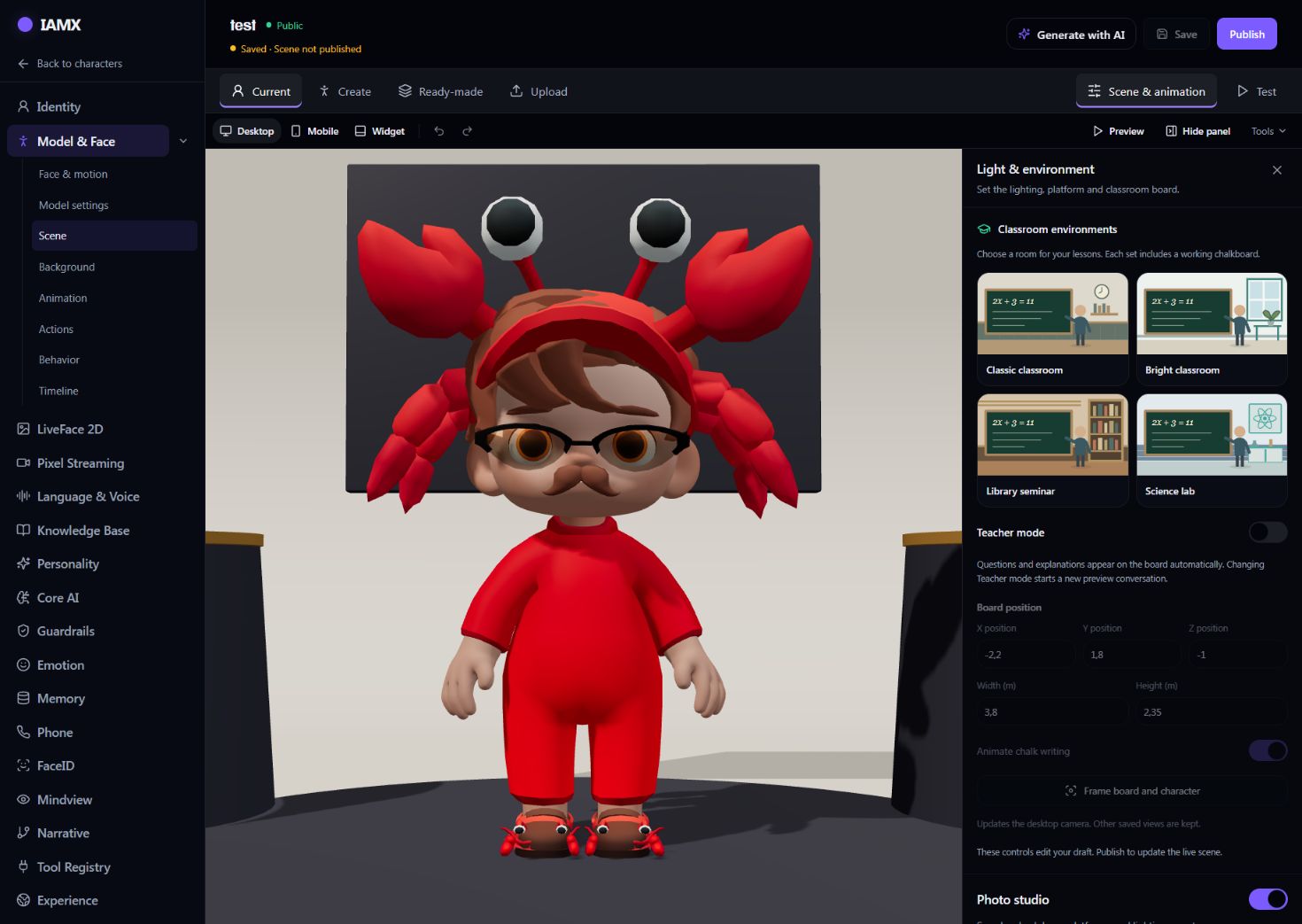
The classroom controls belong to the character's scene in IAMX Studio. Each classroom preset includes a working chalkboard that serves as the AI tutor's whiteboard.
- Open the classroom controls
Open the character, go to Model & Face → Scene & animation, and open Light & environment in the Scene tools.
- Turn on Teacher Mode
Pick a classroom preset or keep your own background, then switch Teacher Mode on.
- Frame the board
Use Frame board and character in each view you publish (desktop, mobile and widget), then adjust the board position and size so formulas stay readable.
- Add the persona and sources
Describe how the character should teach. On Starter or higher, attach your syllabus in the character's Knowledge Base; realtime speech-to-speech characters do not use these documents.
- Save, test and publish
Save, then in Test ask for an exercise, answer it incorrectly and check both the board and the speech; test calls can use usage units. Then publish the scene and start a new conversation in your embed; a saved draft alone does not update the live scene.
Using the board as an AI math tutor
Short equations are typeset from a supported LaTeX subset. Matrices and LaTeX environments are not supported, and a formula that cannot be typeset appears as plain text, so test the notation you plan to teach.
In the standard conversation mode, spoken math wording is converted for Turkish and English, and other languages hear English math wording; realtime speech-to-speech voices word formulas themselves. The character is instructed to let the student try before it reveals an answer, but that is an instruction to the AI model, not a guarantee of mathematical correctness, so check your worked examples.
IAMX Academy: Turkish tutoring with a teacher's AI avatar
IAMX Academy is a separate Turkish-language learning site. Its accounts are separate from IAMX Studio accounts, and it is not tied to IAMX plans.
- Teachers are asked to upload a teaching document, and a profile is shown to students only after a manual review approves it.
- The AI avatar comes from the teacher's own 3D model after approval, or from a portrait photo when the cloud renderer is available. Teachers pick a premade voice or, after approval, create one from a recording, subject to the voice provider.
- Teachers upload their own course documents of up to 20 MB each. Text is extracted, so scanned pages need a text layer.
- Lessons are guided explanations the teacher writes, open question-and-answer sessions or quizzes, each assigned to an individual student. Teachers can rehearse a draft for up to 30 minutes without using a student's hours.
The avatar uses the teacher's assigned documents to shape its answers. Answers are AI-generated and should be checked, and a Q&A lesson without assigned sources may use general knowledge.
Lesson time for students, reports for teachers
Students buy lesson-hour packages for a specific teacher, priced in Turkish lira on Academy, once that teacher's avatar and voice are ready. Time is used only after the student starts the lesson and stops while it is paused.
Students talk or type to the teacher's AI avatar in Turkish; speaking needs browser microphone permission. The lesson board shows text, the teacher's images, quiz options and simple diagrams, and, while Academy's AI model accepts images, students can draw a solution for AI feedback that never changes quiz scores.
Teachers see each student's study time, quiz answers and results by topic, which depend on how the teacher tags questions. After a student's first lesson, a teacher can generate an AI summary of that student's recorded work at most once a day; it is AI-written, may be wrong and is not an assessment.
Corporate training and onboarding
In a character's Experience settings, you can define up to 20 rehearsal scenarios in which a person role-plays with the AI and gets feedback against your weighted rubric; scenarios must be published before use. A rehearsal runs only for a user signed in to the IAMX account that owns the character, and IAMX has no team seats or invitations, so rehearsal is a Studio practice tool for trainer-led or supervised practice, not a link you send to staff. There is no per-trainee roster or score export, and the scores are AI feedback for practice, not formal assessments.
For onboarding, an IAMX character can answer employee questions from documents you upload, such as a handbook, on Starter or higher (not with realtime speech-to-speech voices); test the answers before rollout. There is no HR-system integration or built-in single sign-on, so keep an internal assistant behind your own sign-in or private API-key access.
What IAMX does not provide for education
IAMX Teacher Mode and IAMX Academy are tutoring and practice tools, not a learning management system or a credentialing service.
- No LMS connectors and no SCORM, xAPI or LTI support.
- No single sign-on, group or classroom enrollment, certificates or parent accounts.
- No live teacher in Academy lessons: the student talks to the teacher's AI avatar.
- No promise of learning outcomes; answers and feedback are AI-generated and can be wrong.
For setup details, read the Teacher Mode guide and the Academy guide.
Frequently asked questions
Which languages does the AI teacher speak?
IAMX Teacher Mode follows the character's conversation languages, which depend on the selected AI model, speech recognition and voice. In the standard conversation mode, spoken math wording is converted only for Turkish and English, and IAMX has not documented tests of teaching quality in languages other than Turkish, so test each language you plan to use. IAMX Academy is Turkish only.
Does an AI teacher avatar replace human teachers?
No. In IAMX Academy, a teacher prepares the avatar, documents and lessons and can review each student's recorded work, while the student talks to the AI avatar rather than to the teacher live. In both Academy and Teacher Mode, answers are AI-generated and should be checked.
Does IAMX grade students?
IAMX Teacher Mode creates no student accounts, lesson hours or grades. IAMX Academy checks quiz answers against the teacher's answer key and shows results by topic, but open answers that do not match the key stay ungraded and the optional AI summary is not an assessment.
Can IAMX connect to our LMS?
No. IAMX has no LMS connectors, no SCORM, xAPI or LTI support, no single sign-on and no learner-completion tracking. Any connection to another system would have to be built by you; contact IAMX for API documentation.
Can students use it on a phone?
IAMX Teacher Mode and IAMX Academy both run in a phone's web browser, with no native app, and typing works without microphone permission. IAMX web embeds adapt to phone browsers and Academy has responsive layouts, but IAMX has not documented tests on physical phones or in-app web views, so frame the board in the mobile view and test on your learners' devices.
What is the difference between Teacher Mode and IAMX Academy?
IAMX Teacher Mode is a Studio setting that adds a classroom board to a character you publish on your own website. IAMX Academy is a separate Turkish tutoring site with its own accounts, where teachers prepare an AI avatar and lessons, a manual review decides whether a teacher's profile is shown to students, and students buy lesson hours with a specific teacher.
Try your own workflow.
Prepare a character, ask real questions and check the experience on the device you intend to use. Contact us to discuss the scope of your setup.
Prepared by IAMX. Features and requirements.