Tool Registry
The difference between a character that talks about doing something and one that does it.
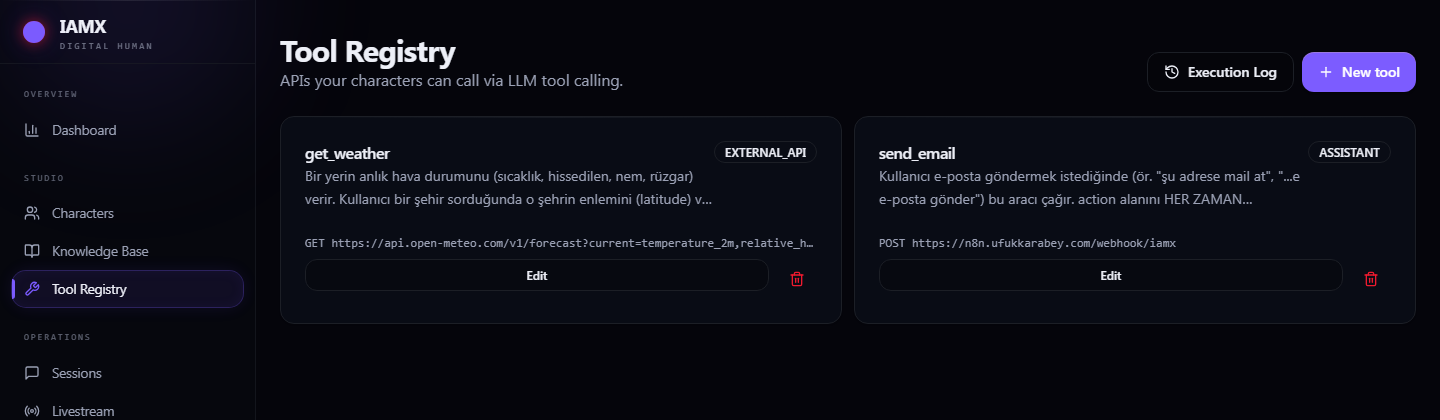
A tool is an HTTP endpoint the character is allowed to call mid-conversation. It decides for itself when the conversation calls for it, fills in the parameters from what the person said, calls your API, and works the result into its answer.
Start from a template
New tool opens with five ready-made definitions. Click one and the whole form fills in; you supply only the URL and the key.
| Template | What it does | You provide |
|---|---|---|
| Weather | Current conditions for any location | Nothing — it needs no key. The best first test. |
| Banking (webhook) | Transfers, balances and statements through your automation platform | Webhook URL + secret |
| ID verification | Verifies a national ID chip plus a live face match | Your identity server + token |
| Noise reduction | Cleans the microphone recording before transcription | Your processing server |
| IBAN correction | Normalises spoken account numbers into proper format | Optional server URL |
Defining your own
| Field | What to enter |
|---|---|
| Name | Lower case with underscores — send_email, check_order. This is the name the AI sees. |
| Category | Banking, Assistant, External API or Custom. Labelling only; it colours the badge in the list. |
| Description | The most important field. Write the trigger, not the mechanics: "Use this when the customer asks about the status of an existing order." This sentence is the entire basis on which the character decides to call it. |
| Method & URL | Your endpoint, reachable from the public internet. |
| Auth Type | None · Bearer token · Basic · API key in a header · API key in the query string. Credentials are stored encrypted and never shown to the character. |
| Parameter Schema | The inputs, in JSON Schema. Give every parameter a plain-language description — that is what the model reads when filling it in. |
| Timeout | How long to wait before giving up. Keep it short for anything in a live conversation; nobody waits 30 seconds mid-sentence. |
| Identity must be verified | Blocks the call unless the person has been identity-verified. Turn it on for anything touching money or personal records. |
Attaching it to a character
Defining a tool does not give any character permission to use it. Open the character's Tool Registry tab and switch it on there. That way the same banking tool can be available to your verified-customer character and invisible to the one on your public website.
Security
- Your endpoint must be publicly reachable. Addresses on your local network or
localhostare refused on purpose — otherwise a character could be talked into probing private infrastructure from inside our servers. Self-hosted automation needs a public address or a tunnel. - Credentials never reach the model. The character knows the tool's name, description and parameters — never its URL secrets or keys.
- Identity gating is enforced server-side. A tool marked as requiring verification is refused even if the character decides to call it.
- Design for a confused caller. The character is talking to a human who may be wrong. Your endpoint should validate everything and fail with a clear message the character can read out.
The execution log
Execution Log in the header is the audit trail: which tool was called, by which character, for which person, with which arguments, and from which conversation. Each row links back to the transcript that triggered it.
Editing and removing
Edit on any tool card reopens the same form with its current values. Changes apply to conversations that start after the save. Delete removes it from the workspace and from every character it was attached to.