Streaming & podcast
Always-on hosts, unscripted duos, and scenes full of characters.
IAMX characters were built for more than one-on-one kiosk chats. The same pipeline that drives a single interactive host scales up into three long-form formats: a solo character that streams live for hours, a pair of characters that hold an unscripted conversation with each other, and whole scenes where several distinct characters share a level. This page covers all three, the Blueprint surface that drives them, and the operator tooling that keeps a live broadcast under control.
AI stream host
One character, running 24/7, reading and reacting to a moderated queue of viewer messages in real time.
Podcast mode
Two characters talk to each other — unscripted, on a topic you set, each with its own personality and voice.
Multi-character scenes
Many characters per level, each with its own brain and knowledge, gated by proximity so only the nearest one hears you.
AI stream host
An AI stream host is a single IAMX character configured to perform continuously — greeting new arrivals, reacting to chat, filling quiet moments with its own remarks, and never dropping the persona. Because the character is always live, the important design problem is not "how does it talk" but "how do you decide what reaches it." That is what the livestream queue solves.
How the moderated queue works
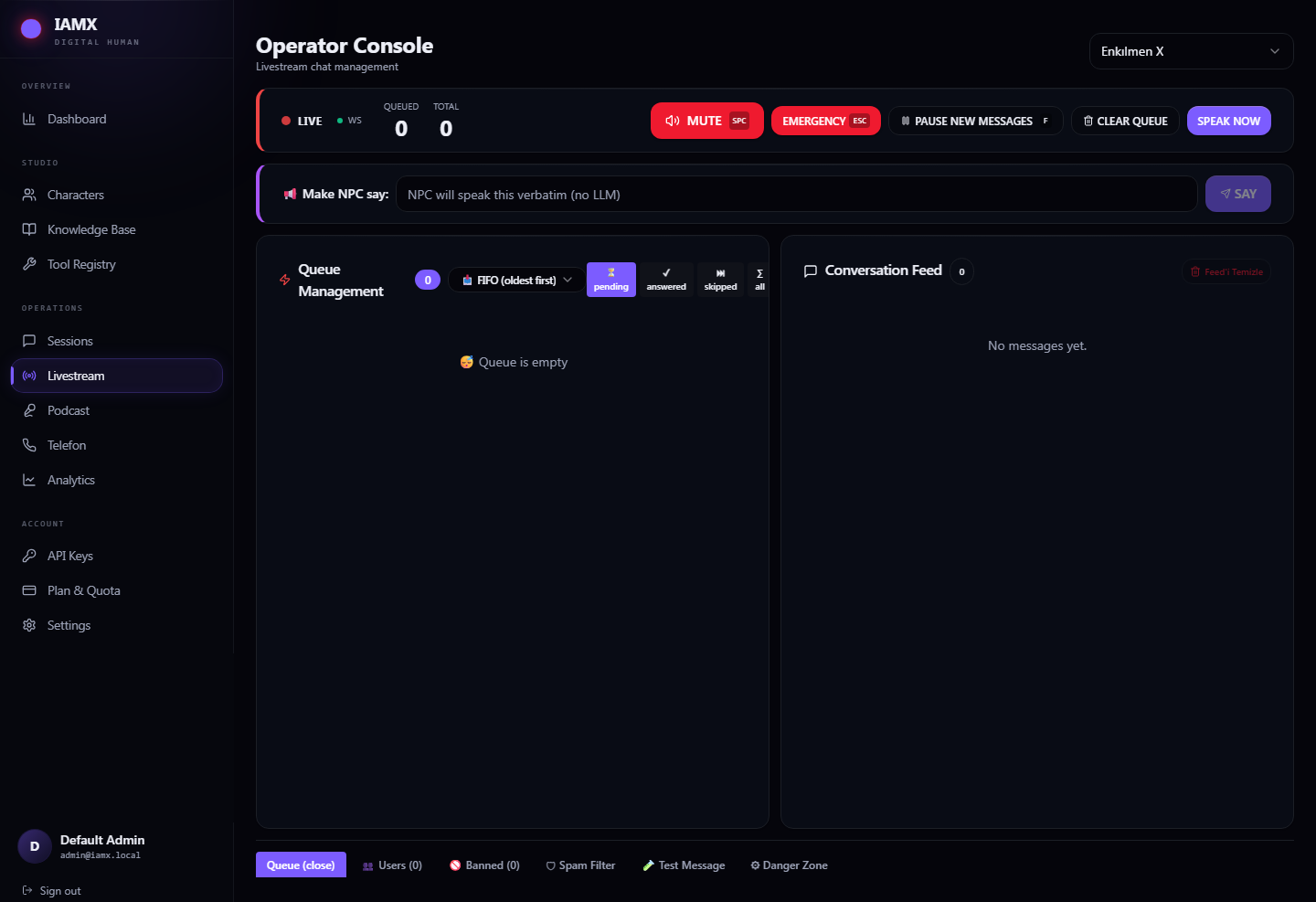
Every incoming viewer message is pushed onto a queue rather than spoken immediately. The character pulls from the front of the queue when it is ready for the next turn, so audio never overlaps and the host is never interrupted mid-sentence by a flood of chat. Between the raw viewer feed and the character sits an operator console — a moderator can approve, hold, prioritize, reorder, or inject messages while the character keeps performing.
  Viewers ──▶  [ incoming feed ]
                     │
                     ▼
             ┌──────────────────┐      approve / reject
             │  OPERATOR CONSOLE │◀───  reorder / prioritize
             └──────────────────┘      inject operator note
                     │
                     ▼
             [ livestream queue ]  ──▶  Character speaks next turn
                     ▲
                     │  On Livestream Queue Changed  (UI refresh)
                     ▼
                Operator UI
This gives you a live broadcast that stays on-brand even when chat gets rowdy: off-topic, abusive, or duplicate messages never reach the character, and the moderator can hand-pick which questions get answered next.
Blueprint surface
Everything is driven from four Blueprint members on the character component. Wire your chat ingestion (a websocket, a platform chat API relay, a REST poller — whatever feeds you messages) into Enqueue Livestream Message, and build your moderator panel around the change event.
| Blueprint | Type | What it does |
|---|---|---|
Enqueue Livestream Message | Function | Adds a viewer message to the queue. Pass the display name and text; the character will reach it in turn order. |
Enqueue Operator Message | Function | Injects a high-priority message from the operator — a steering note, a sponsor read, a topic change. Jumps ahead of ordinary viewer traffic. |
Clear Livestream Queue | Function | Flushes all pending messages. Use it at segment boundaries, ad breaks, or when the backlog is stale. |
On Livestream Queue Changed | Event | Fires whenever the queue is added to, consumed, reordered, or cleared. Bind your operator UI here to keep the visible list in sync. |
- Ingest — Relay each viewer message into
Enqueue Livestream Messagewith the viewer's name and text. - Moderate — Bind
On Livestream Queue Changedto redraw your operator list; expose approve/reorder controls that manipulate the queue. - Steer — When you want the host to say something now, call
Enqueue Operator Messageso it leapfrogs the viewer backlog. - Reset — At segment or ad boundaries call
Clear Livestream Queueso the host starts the next block fresh.
On Livestream Queue Changed only reflects the live queue, your held list stays entirely under your own control and never surprises the host.Clear Livestream Queue at natural breaks. A 400-message backlog means the host is answering questions from twenty minutes ago.Podcast mode (NPC to NPC)
Podcast mode turns two IAMX characters toward each other and lets them talk — unscripted. You set a topic and press go; from there each character responds to what the other just said, in character, with its own personality, its own voice, and its own opinions. Nothing is pre-written. The result is a back-and-forth that can run for as long as you like, that you can steer at any moment, and that your audience can join live.
Two distinct minds
Each participant is a full character in its own right — a separate persona, a separate voice, and its own stance on the subject. Because their personalities and knowledge differ, they naturally disagree, build on each other, and change direction. Give one a skeptic's brief and the other an enthusiast's and the same topic produces a genuine debate rather than two voices agreeing politely.
Host A
Curious, fast-talking, asks the naive question the audience is thinking. Warm voice, quick turns.
Host B
Measured contrarian who pushes back and adds detail. Different voice, slower cadence, its own knowledge base.
Blueprint surface
| Blueprint | Type | What it does |
|---|---|---|
Start Podcast | Function | Kicks off the NPC-to-NPC conversation on the topic you provide. The two characters begin trading turns automatically, each replying to the other's last utterance. |
Inject Audience Comment | Function | Drops a live comment or question into the ongoing conversation. The hosts notice it, react to it, and often argue over it — mid-episode, no restart required. |
Event BeginPlay
   └─▶ Start Podcast(
          Topic       = "Will kiosks replace call centers?",
          HostA       = Character_Ava,
          HostB       = Character_Rook )

// later, live, from your chat relay:
Event OnViewerQuestion
   └─▶ Inject Audience Comment(
          From = "mert_92",
Text = "But what about older customers who hate touchscreens?" )- Cast two characters — Place two IAMX characters in the level, each with its own persona, voice, and knowledge. See /docs/multi-character for per-character setup.
- Set the topic — Call
Start Podcastwith a subject line. Keep it a single, opinionated prompt; the hosts do the rest. - Let it run — The characters alternate automatically. No timers to manage; each turn is triggered by the other finishing.
- Bring in the audience — Route live chat into
Inject Audience Commentso viewers can nudge the discussion in real time.
Inject Audience Comment. You get an always-on talk show with a moderated call-in segment.Clear Livestream Queue to drain pending audience comments, then Start Podcast again with a fresh topic for the next segment — the hosts pivot cleanly without a level reload.Multi-character scenes
A level is not limited to one character. You can place as many IAMX characters as your scene needs, and each is fully independent — its own personality, its own voice, its own language model choice (GPT, Claude, Gemini, or a local model via Ollama), and its own knowledge base. A reception desk agent, a technical specialist, and a greeter can all coexist in the same space, each an expert in its own lane.
Per-character independence
| Per character | Configured where | Notes |
|---|---|---|
| Personality & system prompt | Character data asset | Fully independent tone, role, and rules per character. |
| Voice | Character speech settings | Distinct voice per character so listeners can tell them apart. |
| Language model | Character LLM settings | Mix providers in one scene — GPT, Claude, Gemini, or Ollama per character. |
| Knowledge base | Character knowledge settings | Each character can be grounded in its own documents and facts. |
Proximity gating
When several characters share a space, the obvious risk is that everyone answers at once. IAMX solves this with proximity gating: only the character you are near hears you. Walk up to the specialist and the specialist responds; step over to the greeter and the greeter takes over. The others stay quiet until you are within their range. This keeps conversations clean without any manual "select active character" step — physical position is the selector.
          ( you )
             │  in range of Ava only
             ▼
   [ Ava ]◀──●        [ Rook ]         [ Sage ]
   hears you          idle             idle
& replies (out of range) (out of range)Characters talking to each other
Multi-character scenes aren't limited to human-to-character exchanges. The same NPC-to-NPC capability that powers podcast mode works between any characters in the level, so your cast can hold conversations with one another — a specialist can hand a customer off to a colleague, two greeters can banter during quiet periods, or a panel of characters can discuss a topic while a visitor listens in and occasionally chimes in via proximity.
Ambient life
Idle characters chat among themselves so the scene never feels empty, then defer the moment a real visitor approaches.
Handoffs
One character can bring another into the conversation — routing a banking question to the specialist, a directions question to the greeter.
Live panels
Several characters debate a topic on stage while the audience injects questions — a multi-host version of podcast mode.
Putting it together
These three formats are layers of the same system, and they stack:
- Solo host — one character plus the livestream queue and operator console for a moderated 24/7 broadcast.
- Duo — two characters plus
Start PodcastandInject Audience Commentfor an unscripted call-in show. - Ensemble — many characters, proximity-gated for walk-up interaction, with NPC-to-NPC conversation for ambient life, handoffs, and live panels.
Because every layer is exposed through plain Blueprint calls and events, you can prototype in an afternoon and wire it into whatever front end you already run — a stream relay, a kiosk, an event stage, or the hosted panel at iamx.live.
Next steps
Blueprint API
Full reference for every function and event named above. /docs/blueprint-api
Multi-character setup
Per-character personas, voices, models, and knowledge. /docs/multi-character
Interaction modes
Proximity, voice activation, push-to-talk, and manual triggering. /docs/interaction