Start the conversation
The one wire people miss — connect the character to its cloud brain.
You've dropped an IAMX component onto your character, filled in the panel config, and pressed Play — and the character just… stands there. Nine times out of ten, this is the missing wire. The character doesn't come alive on its own. It comes alive the moment you call Start Conversation, which opens the live link between your character and its cloud brain: the reasoning, the voice, the listening, and the lip movement all wake up together.
This page is short on purpose. If you only learn one thing about driving IAMX from Unreal, learn this: Start Conversation is the on switch. Everything else on this page hangs off it.
The one wire
The simplest possible setup is a single wire from your character's Event BeginPlay into Start Conversation on the IAMX component. That's the entire "hello world" of a talking character.
Event BeginPlay -> [ IAMX (component) ] -> Start Conversation
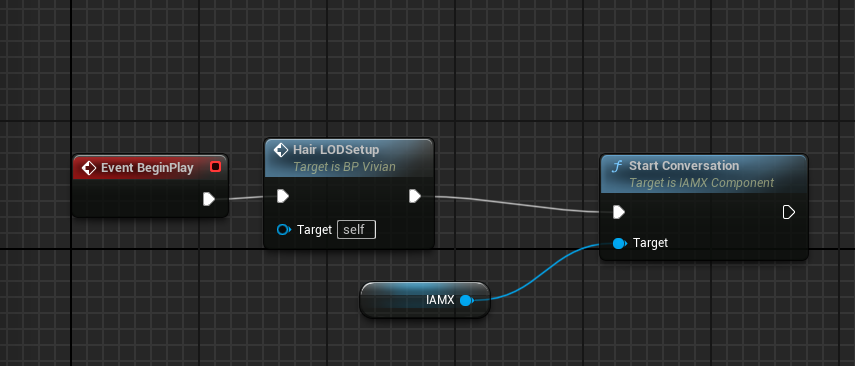
Event BeginPlay runs into Start Conversation, with the IAMX component plugged into Target. Any of your own setup nodes (here a hair LOD step) can sit in between.Once that call lands, the component handshakes with the panel, pulls down the character's brain and voice, warms up listening, and is ready to speak the moment there's something to say. From the player's point of view, the character is now "present" — it can hear, think, and talk.
Driving the session
Once the conversation is live, a handful of calls drive everything that happens inside it. You'll reach for these constantly — to open the mic, feed in text, or cut the character off when the player interrupts. Each one is a Blueprint node on the IAMX component (and each has a matching C++ call if you're working in code).
| Call | What it does | Typical trigger |
|---|---|---|
| Start Conversation | Connects the character to its cloud brain and readies voice + listening. The on switch. | BeginPlay, player enters range, scene begins |
| End Conversation | Disconnects from the cloud brain and tears the session down cleanly. | Player leaves, level ends, character despawns |
| Start Listening | Opens the microphone so the character hears the player. Speech is transcribed and answered. | Push-to-talk key down, "tap to speak" button |
| Stop Listening | Closes the mic and lets the character respond to whatever it just heard. | Push-to-talk key up, silence timeout |
| Send Text Input | Feeds a line of text to the brain as if the player had spoken it — no microphone involved. | Chat box submit, scripted line, quest trigger |
| Interrupt Speech | Cuts the character off mid-sentence and stops it talking immediately. | Player starts speaking, new input arrives, "skip" button |
Voice vs. text
There are two ways to put words in front of the brain, and you can mix them freely in the same session:
By voice
Call Start Listening to open the mic, let the player talk, then Stop Listening. The character transcribes the speech, thinks, and replies out loud. Great for hands-free kiosks and immersive scenes.
By text
Call Send Text Input with a string. The character treats it exactly like spoken input and answers the same way. Perfect for a chat UI, accessibility fallbacks, or scripted beats where you already know the line.
Interrupting cleanly
Real conversations have interruptions. If the player starts talking — or clicks something, or triggers an event — while the character is mid-monologue, call Interrupt Speech. It stops the current line immediately and settles the face back to rest, so the character feels responsive instead of stubbornly finishing its sentence.
PushToTalk (Pressed)  ->  Interrupt Speech        // shut the character up
                      ->  Start Listening         // and start hearing the player

PushToTalk (Released) ->  Stop Listening          // player's done — go answer
Reacting to it
Driving the session is only half the loop. The other half is reacting to what the character does — updating subtitles, triggering an animation when it starts talking, or kicking off game logic once a full response is ready. The IAMX component exposes a set of Blueprint events you can bind to for exactly this.
| Event | Fires when | Great for |
|---|---|---|
| On Response Ready | The brain has produced a full reply. | Logging, analytics, gating game state on what was said |
| On Sentence Spoken | Each sentence is delivered, one at a time. | Subtitles / captions synced to the voice |
| On Speaking Started | The character begins talking. | Focus the camera, dim ambient audio, play a gesture |
| On Speaking Stopped | The character finishes talking. | Return to idle, re-enable the mic, hand control back to the player |
Subtitles in two nodes
On Sentence Spoken is the one most projects wire up first. Because it fires per sentence as the voice plays, you get caption timing for free — no manual string-splitting, no guessing at durations.
On Sentence Spoken (Text)  ->  Set Text (SubtitleWidget)
On Speaking Stopped        ->  Clear Text (SubtitleWidget)
Pair On Speaking Started and On Speaking Stopped to toggle any "is talking right now" state — a mouth-cam, a glowing UI ring, a duck on your background music — and you've got a polished conversational feel with just a few nodes.
Ending the session
When the interaction is over — the player walks away, the level unloads, or the character is about to be destroyed — call End Conversation to disconnect from the cloud brain and release the session cleanly. It closes the mic if it's open, stops any in-progress speech, and drops the live link.
- Detect the exit — an overlap end, a "leave" button,
EndPlay, or your own game logic deciding the conversation is done. - Call End Conversation on the
IAMXcomponent. The character goes quiet and returns to its idle state. - Reconnect anytime — call Start Conversation again later to pick things back up. A fresh call opens a fresh session.
Putting it together
A complete, robust conversational character is really just the on switch, a way to feed it input, a couple of reactions, and the off switch:
Event BeginPlay        ->  Start Conversation

PushToTalk (Pressed)   ->  Interrupt Speech  ->  Start Listening
PushToTalk (Released)  ->  Stop Listening

ChatBox (Submitted)    ->  Send Text Input (message)

On Sentence Spoken     ->  update subtitles
On Speaking Stopped    ->  return to idle / re-enable input

Player left / EndPlay  ->  End Conversation
That's the full lifecycle. Everything richer — actions the character can trigger in your world, vision, memory, narrative flow — layers on top of this same session. But it all starts with the one wire.